
diff options
Diffstat (limited to 'dev-docs/docs/@excalidraw/excalidraw/api/excalidraw-element-skeleton.mdx')
| -rw-r--r-- | dev-docs/docs/@excalidraw/excalidraw/api/excalidraw-element-skeleton.mdx | 475 |
1 files changed, 475 insertions, 0 deletions
diff --git a/dev-docs/docs/@excalidraw/excalidraw/api/excalidraw-element-skeleton.mdx b/dev-docs/docs/@excalidraw/excalidraw/api/excalidraw-element-skeleton.mdx new file mode 100644 index 0000000..b633236 --- /dev/null +++ b/dev-docs/docs/@excalidraw/excalidraw/api/excalidraw-element-skeleton.mdx @@ -0,0 +1,475 @@ +# Creating Elements programmatically + +We support a simplified API to make it easier to generate Excalidraw elements programmatically. This API is in beta and subject to change before stable. You can check the [PR](https://github.com/excalidraw/excalidraw/pull/6546) for more details. + +For this purpose we introduced a new type [`ExcalidrawElementSkeleton`](https://github.com/excalidraw/excalidraw/blob/master/packages/excalidraw/data/transform.ts#L133). This is the simplified version of [`ExcalidrawElement`](https://github.com/excalidraw/excalidraw/blob/master/packages/excalidraw/element/types.ts#L134) type with the minimum possible attributes so that creating elements programmatically is much easier (especially for cases like binding arrows or creating text containers). + +The [`ExcalidrawElementSkeleton`](https://github.com/excalidraw/excalidraw/blob/master/packages/excalidraw/data/transform.ts#L133) can be converted to fully qualified Excalidraw elements by using [`convertToExcalidrawElements`](/docs/@excalidraw/excalidraw/api/excalidraw-element-skeleton#converttoexcalidrawelements). + +## convertToExcalidrawElements + +**_Signature_** + +```ts +convertToExcalidrawElements( + elements: ExcalidrawElementSkeleton, + opts?: { regenerateIds: boolean } +): ExcalidrawElement[] +``` + +| Name | Type | Default | Description | +| --- | --- | --- | --- | +| `elements` | [ExcalidrawElementSkeleton](https://github.com/excalidraw/excalidraw/blob/master/packages/excalidraw/data/transform.ts#L137) | | The Excalidraw element Skeleton which needs to be converted to Excalidraw elements. | +| `opts` | `{ regenerateIds: boolean }` | ` {regenerateIds: true}` | By default `id` will be regenerated for all the elements irrespective of whether you pass the `id` so if you don't want the ids to regenerated, you can set this attribute to `false`. | + +**_How to use_** + +```js +import { convertToExcalidrawElements } from "@excalidraw/excalidraw"; +``` + +This function converts the Excalidraw Element Skeleton to excalidraw elements which could be then rendered on the canvas. Hence calling this function is necessary before passing it to APIs like [`initialData`](https://docs.excalidraw.com/docs/@excalidraw/excalidraw/api/props/initialdata), [`updateScene`](https://docs.excalidraw.com/docs/@excalidraw/excalidraw/api/props/excalidraw-api#updatescene) if you are using the Skeleton API + +## Supported Features + +### Rectangle, Ellipse, and Diamond + +To create these shapes you need to pass its `type` and `x` and `y` coordinates for position. The rest of the attributes are optional\_. + +For the Skeleton API to work, `convertToExcalidrawElements` needs to be called before passing it to Excalidraw Component via initialData, updateScene or any such API. + +```jsx live +function App() { + const elements = convertToExcalidrawElements([ + { + type: "rectangle", + x: 100, + y: 250, + }, + { + type: "ellipse", + x: 250, + y: 250, + }, + { + type: "diamond", + x: 380, + y: 250, + }, + ]); + return ( + <div style={{ height: "500px" }}> + <Excalidraw + initialData={{ + elements, + appState: { zenModeEnabled: true, viewBackgroundColor: "#a5d8ff" }, + scrollToContent: true, + }} + /> + </div> + ); +} +``` + +You can pass additional [`properties`](https://github.com/excalidraw/excalidraw/blob/master/packages/excalidraw/element/types.ts#L27) as well to decorate the shapes. + +:::info + +You can copy the below test examples and replace the elements in the live editor above to test it out. + +::: + +```js +convertToExcalidrawElements([ + { + type: "rectangle", + x: 50, + y: 250, + width: 200, + height: 100, + backgroundColor: "#c0eb75", + strokeWidth: 2, + }, + { + type: "ellipse", + x: 300, + y: 250, + width: 200, + height: 100, + backgroundColor: "#ffc9c9", + strokeStyle: "dotted", + fillStyle: "solid", + strokeWidth: 2, + }, + { + type: "diamond", + x: 550, + y: 250, + width: 200, + height: 100, + backgroundColor: "#a5d8ff", + strokeColor: "#1971c2", + strokeStyle: "dashed", + fillStyle: "cross-hatch", + strokeWidth: 2, + }, +]); +``` + + + +### Text Element + +The `type`, `x`, `y` and `text` properties are required to create a text element, rest of the attributes are optional + +```js +convertToExcalidrawElements([ + { + type: "text", + x: 100, + y: 100, + text: "HELLO WORLD!", + }, + { + type: "text", + x: 100, + y: 150, + text: "STYLED HELLO WORLD!", + fontSize: 20, + strokeColor: "#5f3dc4", + }, +]); +``` + + + +### Lines and Arrows + +The `type`, `x`, and `y` properties are required, rest of the attributes are optional + +```js +convertToExcalidrawElements([ + { + type: "arrow", + x: 100, + y: 20, + }, + { + type: "line", + x: 100, + y: 60, + }, +]); +``` + + + +#### With Addtional properties + +```js +convertToExcalidrawElements([ + { + type: "arrow", + x: 450, + y: 20, + startArrowhead: "dot", + endArrowhead: "triangle", + strokeColor: "#1971c2", + strokeWidth: 2, + }, + { + type: "line", + x: 450, + y: 60, + strokeColor: "#2f9e44", + strokeWidth: 2, + strokeStyle: "dotted", + }, +]); +``` + + + +### Text Containers + +In addition to `type`, `x` and `y` properties, [`label`](https://github.com/excalidraw/excalidraw/blob/master/packages/excalidraw/data/transform.ts#L124C7-L130C59) property is required for text containers. The `text` property in `label` is required, rest of the attributes are optional. + +If you don't provide the dimensions of container, we calculate it based of the label dimensions. + +```js +convertToExcalidrawElements([ + { + type: "rectangle", + x: 300, + y: 290, + label: { + text: "RECTANGLE TEXT CONTAINER", + }, + }, + { + type: "ellipse", + x: 500, + y: 100, + label: { + text: "ELLIPSE\n TEXT CONTAINER", + }, + }, + { + type: "diamond", + x: 100, + y: 100, + label: { + text: "DIAMOND\nTEXT CONTAINER", + }, + }, +]); +``` + +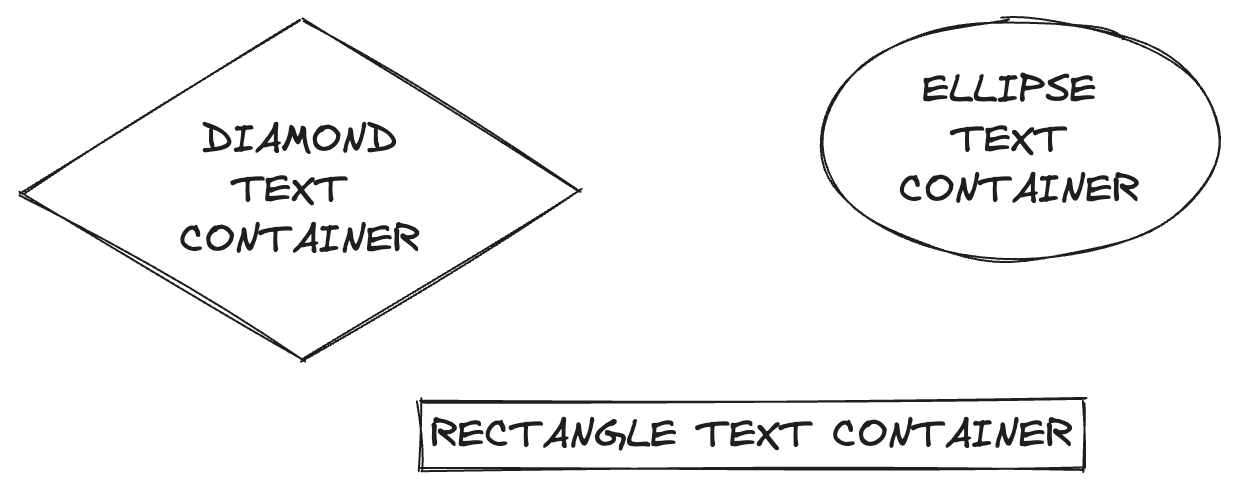 + +#### With Additional properties + +```js +convertToExcalidrawElements([ + { + type: "diamond", + x: -120, + y: 100, + width: 270, + backgroundColor: "#fff3bf", + strokeWidth: 2, + label: { + text: "STYLED DIAMOND TEXT CONTAINER", + strokeColor: "#099268", + fontSize: 20, + }, + }, + { + type: "rectangle", + x: 180, + y: 150, + width: 200, + strokeColor: "#c2255c", + label: { + text: "TOP LEFT ALIGNED RECTANGLE TEXT CONTAINER", + textAlign: "left", + verticalAlign: "top", + fontSize: 20, + }, + }, + { + type: "ellipse", + x: 400, + y: 130, + strokeColor: "#f08c00", + backgroundColor: "#ffec99", + width: 200, + label: { + text: "STYLED ELLIPSE TEXT CONTAINER", + strokeColor: "#c2255c", + }, + }, +]); +``` + +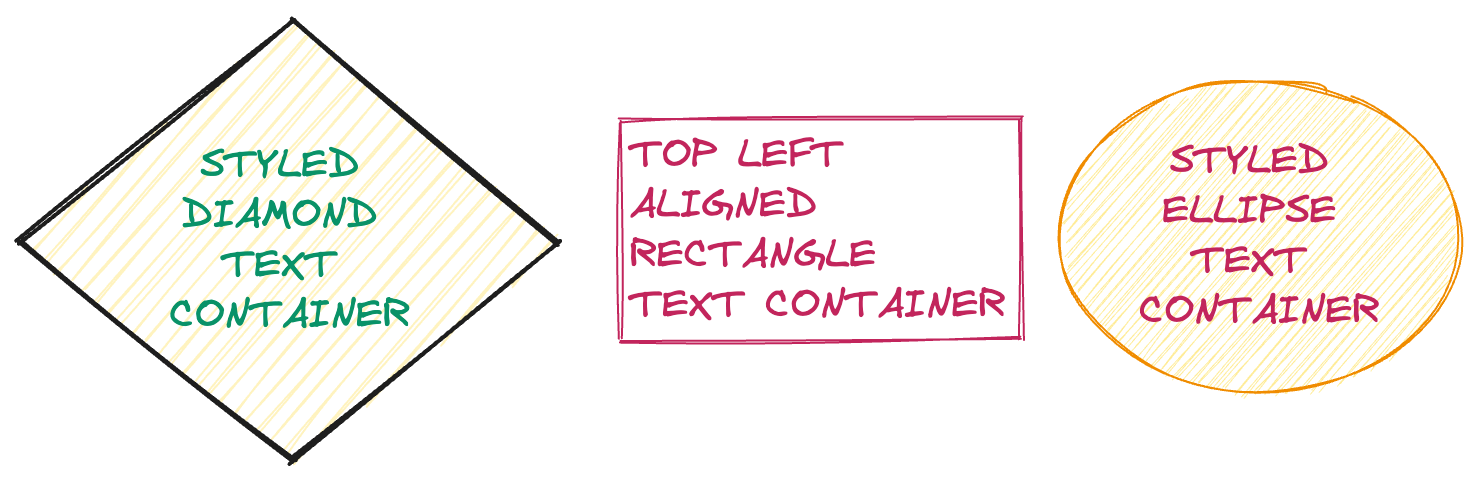 + +### Labelled Arrows + +Similar to Text Containers, you can create labelled arrows as well. + +```js +convertToExcalidrawElements([ + { + type: "arrow", + x: 100, + y: 100, + label: { + text: "LABELED ARROW", + }, + }, + { + type: "arrow", + x: 100, + y: 200, + label: { + text: "STYLED LABELED ARROW", + strokeColor: "#099268", + fontSize: 20, + }, + }, + { + type: "arrow", + x: 100, + y: 300, + strokeColor: "#1098ad", + strokeWidth: 2, + label: { + text: "ANOTHER STYLED LABELLED ARROW", + }, + }, + { + type: "arrow", + x: 100, + y: 400, + strokeColor: "#1098ad", + strokeWidth: 2, + label: { + text: "ANOTHER STYLED LABELLED ARROW", + strokeColor: "#099268", + }, + }, +]); +``` + +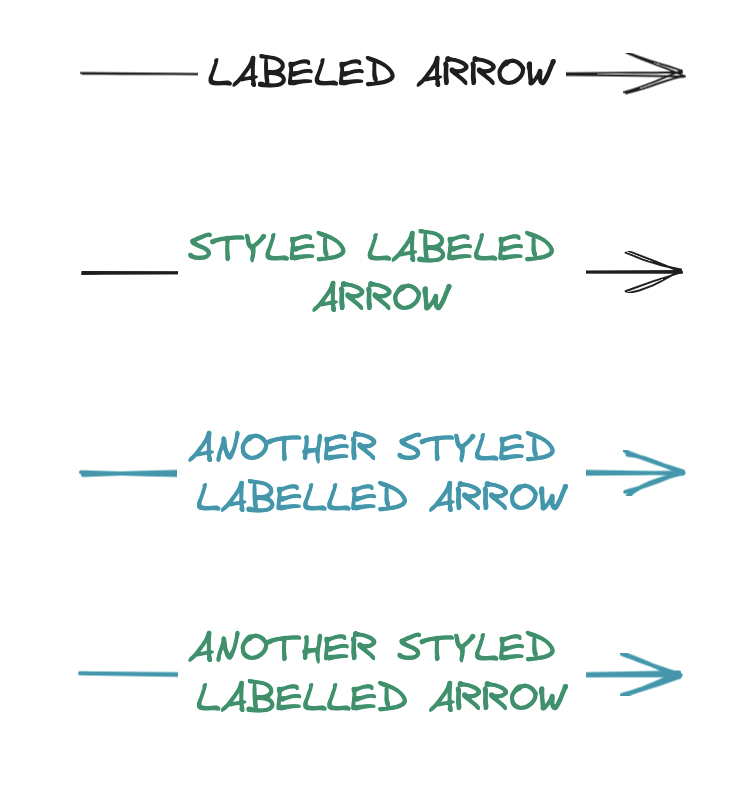 + +### Arrow bindings + +To bind arrow to a shape you need to specify its [`start`](https://github.com/excalidraw/excalidraw/blob/master/packages/excalidraw/data/transform.ts#L86) and [`end`](https://github.com/excalidraw/excalidraw/blob/master/packages/excalidraw/data/transform.ts#L54) properties. You need to pass either `type` or `id` property in `start` and `end` properties, rest of the attributes are optional + +```js +convertToExcalidrawElements([ + { + type: "arrow", + x: 255, + y: 239, + label: { + text: "HELLO WORLD!!", + }, + start: { + type: "rectangle", + }, + end: { + type: "ellipse", + }, + }, +]); +``` + +When position for `start` and `end ` properties are not specified, we compute it according to arrow position. + +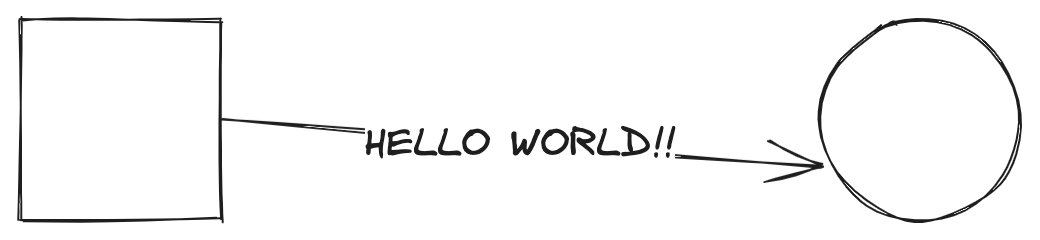 + +```js +convertToExcalidrawElements([ + { + type: "arrow", + x: 255, + y: 239, + label: { + text: "HELLO WORLD!!", + }, + start: { + type: "text", + text: "HEYYYYY", + }, + end: { + type: "text", + text: "WHATS UP ?", + }, + }, +]); +``` + + + +#### When passing `id` + +Useful when you want to bind multiple arrows to one diagram / use some existing diagram + +```js +convertToExcalidrawElements([ + { + type: "ellipse", + id: "ellipse-1", + strokeColor: "#66a80f", + x: 390, + y: 356, + width: 150, + height: 150, + backgroundColor: "#d8f5a2", + }, + { + type: "diamond", + id: "diamond-1", + strokeColor: "#9c36b5", + width: 100, + x: -30, + y: 380, + }, + { + type: "arrow", + x: 100, + y: 440, + width: 295, + height: 35, + strokeColor: "#1864ab", + start: { + type: "rectangle", + width: 150, + height: 150, + }, + end: { + id: "ellipse-1", + }, + }, + { + type: "arrow", + x: 60, + y: 420, + width: 330, + strokeColor: "#e67700", + start: { + id: "diamond-1", + }, + end: { + id: "ellipse-1", + }, + }, +]); +``` + +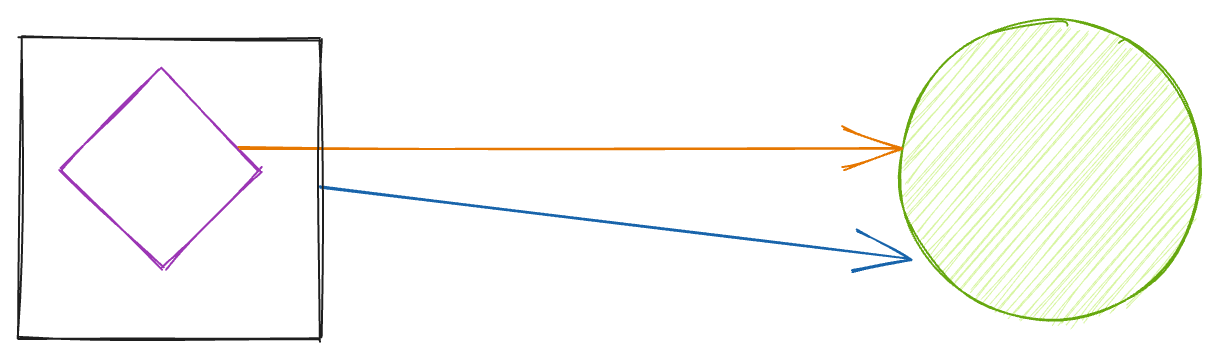 + +### Frames + +To create a frame, you need to pass `type`, `children` (list of Excalidraw element ids). The rest of the attributes are optional. + +```ts +{ + type: "frame"; + children: readonly ExcalidrawElement["id"][]; + name?: string; + } & Partial<ExcalidrawFrameElement>); +``` + +```ts +convertToExcalidrawElements([ + { + "type": "rectangle", + "x": 10, + "y": 10, + "strokeWidth": 2, + "id": "1" + }, + { + "type": "diamond", + "x": 120, + "y": 20, + "backgroundColor": "#fff3bf", + "strokeWidth": 2, + "label": { + "text": "HELLO EXCALIDRAW", + "strokeColor": "#099268", + "fontSize": 30 + }, + "id": "2" + }, + { + "type": "frame", + "children": ["1", "2"], + "name": "My frame" + }] +} +``` |