blob: 35743055decf4295370f7ed249b38ebdefcf3ba2 (
plain)
1
2
3
4
5
6
7
8
9
10
11
12
13
14
15
16
17
18
19
20
21
22
23
24
25
26
27
28
29
30
31
32
33
34
35
36
37
38
39
40
41
42
43
44
45
46
47
48
49
50
51
52
53
54
55
56
57
58
59
60
61
62
63
64
65
66
67
68
69
70
71
72
73
74
75
76
77
78
79
80
81
82
83
84
85
86
87
88
89
90
91
92
93
94
95
96
97
98
99
100
101
102
103
104
105
106
107
108
109
|
# dateTimeSetter ⌚
*Easily Adjust Date & Time in Standalone Window Managers*
## Rationale
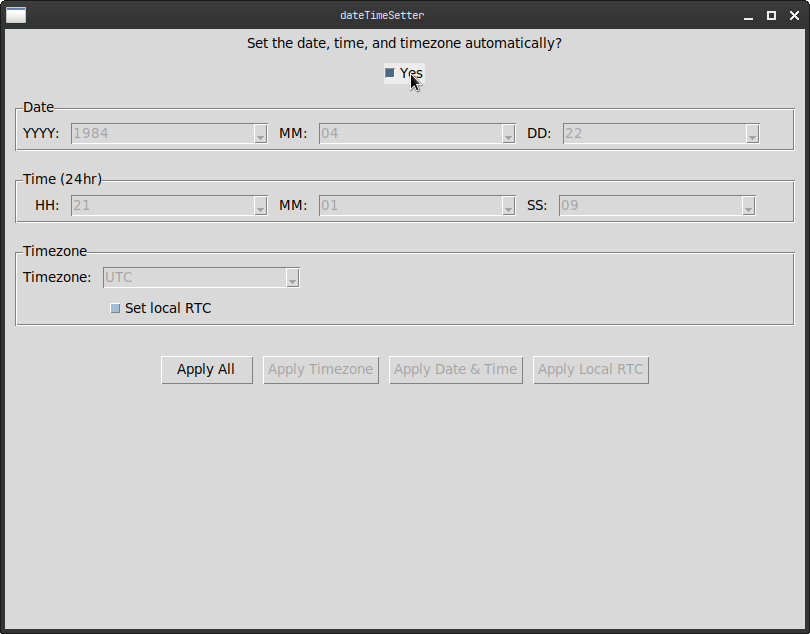
I use a standalone Window Manager on Linux (no Desktop Environment) and I missed having a simple GUI to quickly change Timezones and toggle NTP in a settings panel, which is commonly found in Desktop Environments. To address this, I made `dateTimeSetter`, a simple "date & time setter" written in Python and Tk.
## Features
* Simple as possible, so that it just gets out of your way and you can proceed with your life.
* Can manipulate the following through the interface:
* Date
* Time
* Timezone
* Local RTC setting
* NTP
* Automatically sets the Date, Time, and Timezone with a checkbox.
* `Makefile`
* I've also included a Makefile that utilizes `cython3` to create a `.c` file from the `.py` code and then compile with `gcc` into a single binary.
* I can't really vouch for the continued reliability of the `Makefile` nor can I promise a significant performance increase with it being compiled as C code, but it's there if you want to give it a go 😌.
* You will need to have `cython`, `gcc`, and `make` installed on your system (on top of the dependencies listed below) to utilize the `Makefile`.
## Dependencies
To use `dateTimeSetter`, you will need to install the following dependencies. Here are some instructions on how to install them on various Linux distributions:
### Ubuntu / Debian
```sh
sudo apt update
sudo apt install python3-tk python3-pip
pip3 install pytz requests
```
### Fedora
```sh
sudo dnf install python3-tkinter python3-pip
pip3 install pytz requests
```
### Arch Linux
```sh
sudo pacman -S tk python-pip python-pytz python-requests
```
## Usage
```sh
$ python3 ./dateTimeSetter.py
```
or simply…
```sh
$ ./dateTimeSetter.py
```
### How I Like to Run it On My Machines
As seen on my [dotfiles repo](https://github.com/kj-sh604/dotfiles), I wrap the usage of `dateTimeSetter` in a script:
*I have it named as* `dateTime` *on my system*
```sh
#!/bin/sh
BIN_PATH=~/.local/share/python-dateTimeSetter/dateTime
SCRIPT_PATH=~/.local/share/python-dateTimeSetter/dateTime.py
if [ -f "$BIN_PATH" ]; then
if command -v lxsudo > /dev/null 2>&1; then
lxsudo $BIN_PATH
elif command -v gksudo > /dev/null 2>&1; then
gksudo $BIN_PATH
elif command -v pkexec > /dev/null 2>&1; then
pkexec env DISPLAY="$DISPLAY" XAUTHORITY="$XAUTHORITY" $BIN_PATH
else
echo "No suitable graphical authentication tool found. Running without root privileges."
notify-send "No suitable graphical authentication tool found. Running without root privileges."
$BIN_PATH
fi
elif [ -f "$SCRIPT_PATH" ]; then
if command -v lxsudo > /dev/null 2>&1; then
lxsudo python3 $SCRIPT_PATH
elif command -v gksudo > /dev/null 2>&1; then
gksudo python3 $SCRIPT_PATH
elif command -v pkexec > /dev/null 2>&1; then
pkexec env DISPLAY="$DISPLAY" XAUTHORITY="$XAUTHORITY" python3 $SCRIPT_PATH
else
echo "No suitable graphical authentication tool found. Running without root privileges."
notify-send "No suitable graphical authentication tool found. Running without root privileges."
python3 $SCRIPT_PATH
fi
else
echo "dateTime/dateTime.py not found"
notify-send "Error!" "dateTime/dateTime.py not found" --urgency critical
fi
```
Feel free to implement something similar.
I hope that some of you would find this useful 😌
Happy hacking everyone! 🧑💻🤙
|
